

Every Claude Code session starts as a blank slate. When you close your terminal or disconnect from a session, Claude forgets everything—your project structure, recent refactoring decisions, debugging discoveries, and architectural patterns. This forces you to repeatedly explain your codebase, burning tokens on redundant context and breaking workflow continuity.
Claude-Mem eliminates this friction by automatically capturing everything Claude does during your coding sessions, compressing it with AI, and injecting relevant context back into future sessions. With over 21,500 GitHub stars and rapidly growing adoption in early 2026, this plugin has become essential for developers serious about AI-assisted development.
The Problem: Context Amnesia in AI Development
The fundamental challenge with AI coding assistants is their stateless nature. Each session is an isolated conversation with no memory of previous interactions. Developers currently work around this limitation through brittle, time-consuming methods:
- Manual CLAUDE.md files that require constant updates
- Separate documentation notes that never capture full context
- Re-explaining project architecture at the start of every session
- Token waste from repetitive context building
These approaches fragment your development history and never capture the rich decision-making process that occurs during real coding sessions. The cost accumulates quickly—hours lost to context rebuilding and thousands of tokens wasted on redundant explanations.
Claude-Mem: Persistent Memory for Claude Code
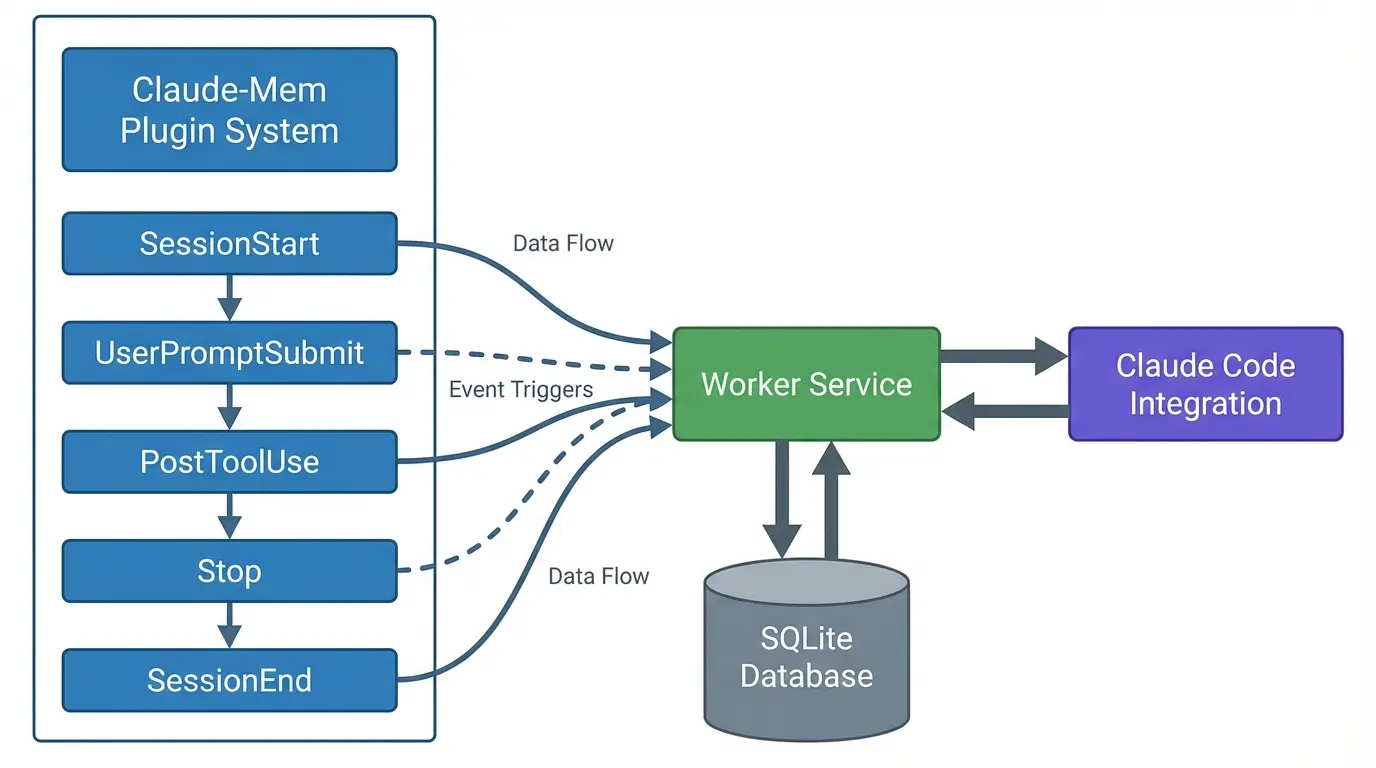
Claude-Mem operates as a persistent memory compression system built specifically for Claude Code. The plugin automatically observes every tool invocation, captures the input and output, processes it through Claude’s Agent SDK for semantic compression, and stores the results in a local SQLite database with full-text search capabilities.
Core Architecture Components
Five Lifecycle Hooks:
- SessionStart — Injects relevant context from previous sessions when you begin
- UserPromptSubmit — Captures your queries for pattern recognition
- PostToolUse — Observes every tool execution and its output
- Stop — Generates session summaries when Claude finishes responding
- SessionEnd — Finalizes session storage and cleanup
Smart Compression:
- Raw tool output: 1,000 to 10,000 tokens
- Semantic observation: ~500 tokens
- Compression ratio: 95% token reduction while preserving meaning
Local-First Storage:
- SQLite database at
~/.claude-mem/claude-mem.db - Complete data locality—nothing leaves your machine
- FTS5 full-text search for instant queries
Installation: Two Commands, Zero Configuration
Installing Claude-Mem is remarkably simple:
> /plugin marketplace add thedotmack/claude-mem
> /plugin install claude-mem
Restart Claude Code, and the plugin automatically handles the rest:
- Downloads prebuilt binaries
- Installs dependencies (Bun runtime, SQLite)
- Configures lifecycle hooks
- Auto-starts the worker service on first session
System Requirements:
- Node.js 18.0.0 or higher
- Latest Claude Code with plugin support
- Bun (auto-installed if missing)
- Cross-platform: Windows, macOS, Linux
Progressive Disclosure: Token-Efficient Memory Retrieval
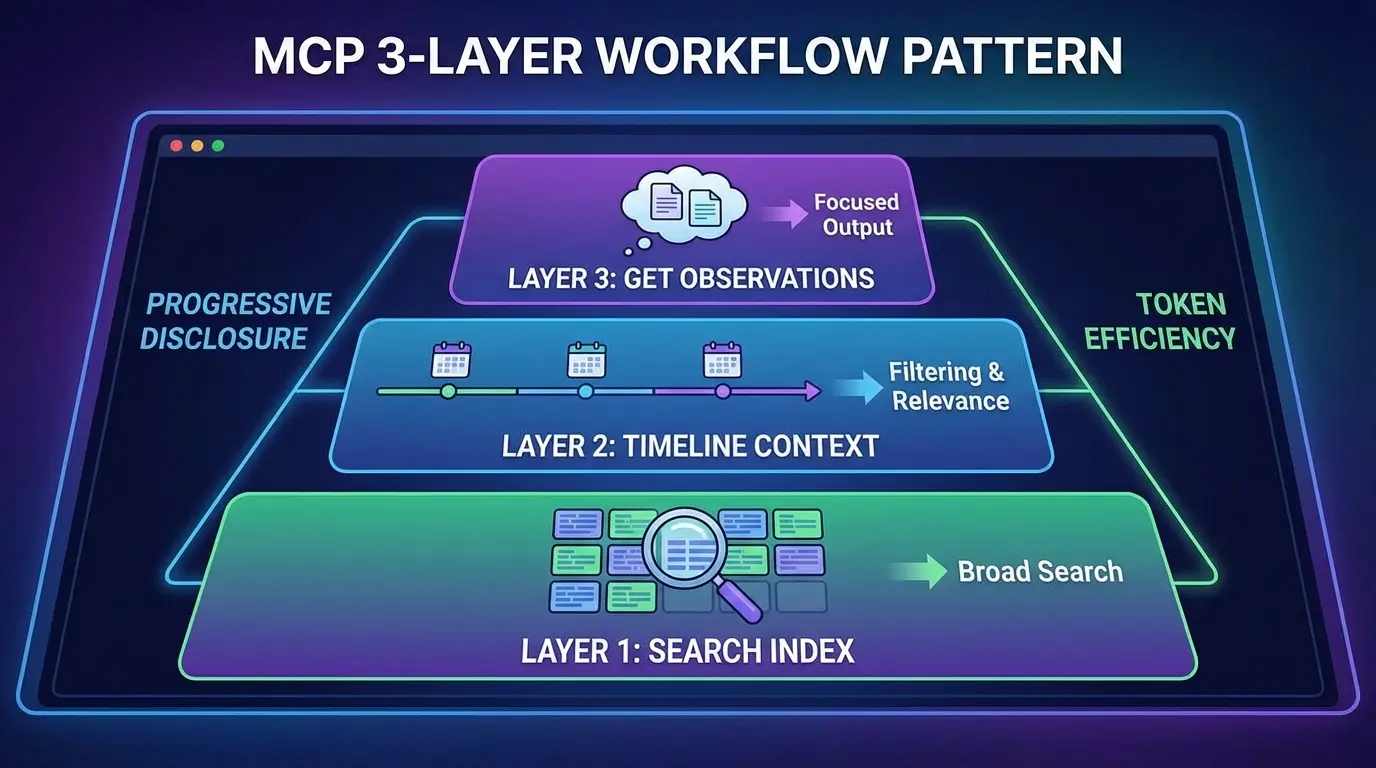
The genius of Claude-Mem lies in its progressive disclosure architecture. Instead of dumping your entire development history into context, the system retrieves memories in layers, achieving approximately 10x token efficiency compared to manual context management.
The 3-Layer Workflow
Layer 1: Search Index (~50-100 tokens per result)
- Compact index with observation IDs, titles, types, timestamps
- Filter by type (decision, bugfix, feature, refactor, discovery, change)
- Filter by date range or project scope
Layer 2: Timeline Context (on-demand)
- Chronological view around specific observations
- Shows what led to a decision and what followed
- Essential for understanding causality
Layer 3: Full Observation Details (~500-1,000 tokens per result)
- Complete narrative with before/after context
- Bullet-point facts and key learnings
- Fetched only for relevant IDs
This approach means you only pay token costs for the context you actually need, not your entire development history.
MCP Search Tools
Claude-Mem exposes four MCP tools that implement this workflow:
search— Search memory index with full-text queriestimeline— Get chronological context around observationsget_observations— Fetch full details by IDs (batch multiple IDs)__IMPORTANT— Workflow documentation always visible to Claude
Example Usage:
// Step 1: Search for the bug
search(query="authentication bug", type="bugfix", limit=10)

// Step 2: Review index, identify relevant IDs (e.g., #123, #456)

// Step 3: Fetch full details for relevant observations
get_observations(ids=[123, 456])
Natural Language Memory Queries
One of Claude-Mem’s most powerful features is its natural language query capability. You can ask Claude directly about your project history:
- “What did we decide about error handling?”
- “How did we implement authentication?”
- “What bugs did we fix in the API layer?”
- “Show me changes to the database schema”
Claude automatically invokes the appropriate MCP tools, retrieves relevant context, and presents findings with claude-mem:// URI citations that reference specific observations. This feels like having a conversation with a colleague who has perfect memory of every development session.
Web Viewer UI: Real-Time Memory Monitoring
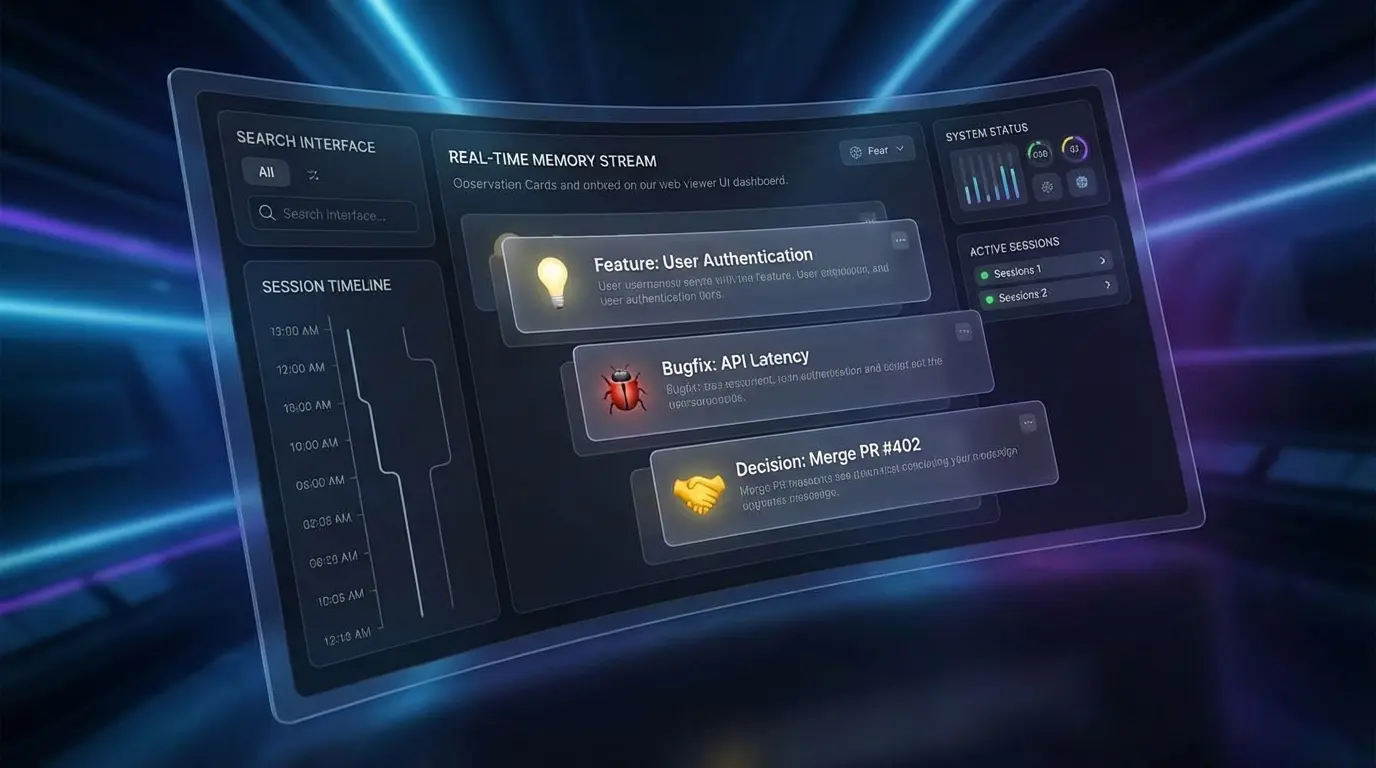
Claude-Mem includes a web viewer UI running at http://localhost:37777 that provides real-time visibility into your memory system:
Features:
- Live observation stream with emoji indicators for observation types
- Session timeline with chronological markers
- Search interface for querying memories
- Settings panel for configuration adjustments
- Version switching between stable and beta channels
The web viewer is optional for basic usage but invaluable for understanding what Claude-Mem captures and how it organizes your development history. You can watch observations appear in real-time as Claude works, providing transparency into the memory formation process.
Privacy Controls and Security
Claude-Mem provides granular privacy controls to prevent sensitive data from entering the memory system:
Private Content Tags
Wrap sensitive content in <private> tags to exclude it from storage:
<private>
API_KEY=sk-live-abc123xyz789
DATABASE_PASSWORD=supersecret456
</private>
The edge processing ensures private content never reaches the database. This is critical for API keys, credentials, and proprietary logic.
Auto-Generated CLAUDE.md Files
Claude-Mem automatically generates CLAUDE.md files in project folders, creating activity timelines that complement the global memory database. Each folder’s CLAUDE.md contains a Recent Activity section showing observation IDs, timestamps, type indicators, brief titles, and estimated token counts.
User Content Preservation:
- Auto-generated content wrapped in
<claude-mem-context>tags - Any content outside these tags is preserved when the file regenerates
- Lets you add custom documentation alongside generated context
Beta Features: Endless Mode
The beta channel offers Endless Mode, a biomimetic memory architecture for extended sessions. Instead of hitting context limits after ~50 tool uses, Endless Mode promises roughly 1,000 uses—a 20x increase.
How it works:
- Compresses tool outputs in real-time
- Reduces tokens by ~95%
- Changes scaling from O(N²) quadratic to O(N) linear
Trade-off: Observation generation adds 60-90 seconds per tool invocation. For deep, thoughtful coding sessions spanning days or weeks, this latency might be acceptable. For rapid-fire tool usage, it could be prohibitive.
Enable beta features from the web viewer UI at http://localhost:37777 → Settings → Version Channel.
Real-World Impact: Developer Productivity
The cumulative effect of Claude-Mem on development workflows is significant:
Token Savings:
- ~2,250 tokens saved per session through progressive disclosure
- 10x efficiency compared to manual context management
- Reduced API costs and faster response times
Time Savings:
- Zero time spent explaining project context
- Instant access to past decisions and their rationale
- Seamless session continuity across days or weeks
Quality Improvements:
- Consistent architectural patterns maintained
- Bug fixes reference previous similar issues
- New developers can query project history instantly
Claude Desktop Integration
Claude-Mem extends beyond Claude Code terminal sessions through Claude Desktop integration. Configure the MCP server in your Claude Desktop settings to access memory from chat conversations:
{
  "mcpServers": {
    "claude-mem": {
      "command": "node",
      "args": ["~/.claude/plugins/marketplaces/thedotmack/mcp-search/index.js"]
    }
  }
}
Once configured, ask naturally about past work:
- “What did we do last session?”
- “Did we fix this bug before?”
- “How did we implement authentication?”
Community and Ecosystem
Claude-Mem’s explosive growth in early 2026 reflects a critical need in the AI development landscape:
GitHub Metrics:
- 21,500+ stars
- 1,400+ forks
- 22 contributors
- 174 releases (as of January 2026)
Community Resources:
- Comprehensive documentation at docs.claude-mem.ai
- Active Discord community for support
- Troubleshooting skill built into the plugin
- Multi-language README (20+ languages)
License: AGPL-3.0 with Ragtime component under PolyForm Noncommercial License
Conclusion: Memory is the Missing Piece
Claude-Mem transforms Claude Code from a stateless assistant into a persistent development partner that accumulates knowledge about your codebase over time. The combination of automatic capture, AI-powered compression, intelligent retrieval, and privacy controls creates a memory system that feels like a natural extension of your own thinking.
For developers investing seriously in AI-assisted development, Claude-Mem has evolved from “nice to have” to essential infrastructure. The time and token savings alone justify the installation, but the deeper value is in the continuity it provides—your AI assistant finally remembers what you’ve built together.
Install Claude-Mem today:
/plugin marketplace add thedotmack/claude-mem
/plugin install claude-mem
Sources
- Claude-Mem Official Website
- GitHub Repository - thedotmack/claude-mem
- Claude-Mem Documentation
- How to Use Claude-mem for Memory Persistence - Apidog
- Claude Code Official Documentation
- Model Context Protocol Documentation
- Top 10 AI Assistants With Memory in 2026 - Dume.ai
- Reddit Discussion - Everyone’s Hyped on Skills